The Photo Extremist YouTube ChannelThe Photo Extremist Twitter Account

24Oct/1135

High-Speed Photography with Splashes, Flashes, and a Fish Tank (Photography Tutorial)

.
.


An inexpensive 10 gallon fish tank was purchased at Walmart for about $12 and was being elevated by two ladders and a strong wooden board between each one. A Squeegee thingy was also purchased with the tank to remove water drops that splash onto the surface of the glass after dropping fruit or vegetables. You will also want to get some Windex and some paper towels to remove any smudges or residue from the glass before setting it up for photos.

20X30 foam board (black) was used as the background. It was being held up by a reflector holder which was attached to a light stand. You can make the background darker if you move it further away from the fish tank, but you will need something bigger than a 20x30 board.

A Nikon SB-700 Flash was underneath the tank on a tripod, aimed up at the board (you only need this flash if you are using a white background) while two LumenPro LP160 flashes were attached to the two light stands on 1/32 power.

One LP160 flash was  above the water aimed downward; this casts the reflections coming from the water surface onto your subject. The second flash was in front of the fishtank, towards the right side, aiming slightly upward at the pepper. You can position the lights in any way you want, this is just how I was doing it for this session.

You may want to get some adjustable brackets to mount to the top of the light stands in order to tilt the flash up and down.

All flashes have RF-602 receivers attached to them, although you can set any given flash to "Slave mode" and it will fire whenever it detects another flash firing, so you don't necessarily need three RF-602 receivers on all of your flashes if you are working in a small studio space like this; you really only need one. The RF-602 receivers can also be placed on any standard tripod screw, so if you already have an extra tripod but no light stands handy, you can just use a regular tripod.

The LumenPro LP160 flashes are only $170 and have the same amount of light output when compared to the Nikon SB-900, a flagship flash that costs $500! Keep in mind the LP160's are manual flashes; nothing about them is automatic. This doesn't bother me at all because I mostly use manual mode anyway.

The camera that was being used (least important item) was a Nikon D300s with a 50mm prime lens and the RF-602 transceiver to fire the flashes when the camera takes a picture.

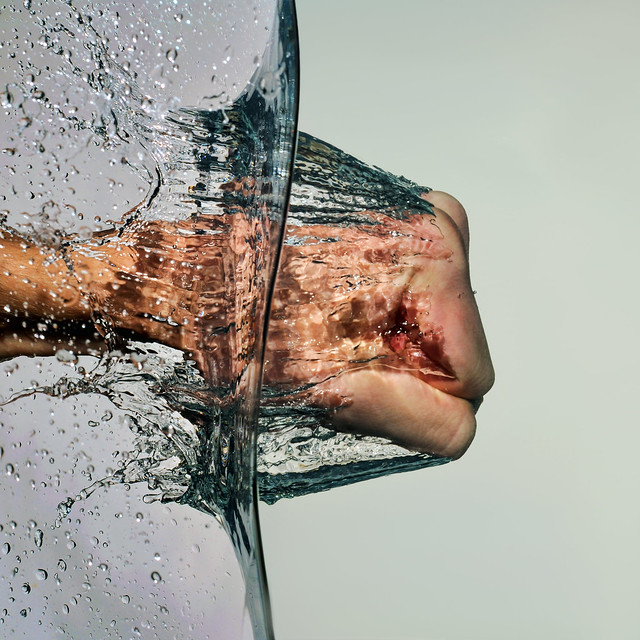
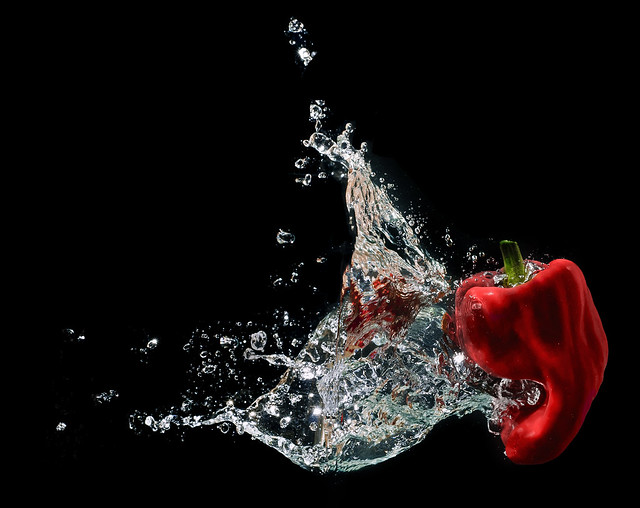
Last but not least: The stuff you drop into the fish tank! In the video I was using regular peppers, but you can use anything.  Legos, coins, lemons, limes, miniature pumpkins... you can even just use your fist to punch the water in anger if you can't decide what to use.

Anger

Pepper

The waterline was removed in Photoshop in the photo above.

If you have any photos that you have created with a fish tank, please share it in a comment download below and I will probably add it to this post.


If you want to learn more about high-speed splash photography,
check out the 4-hour video-course by AKEL Studio.

Click here to view more details.

Filed under: how to, video Leave a comment
Comments (35) Trackbacks (13)
  1. thats awesome! nice tutorial!

  2. Yet another Awesome trick! cheerss…

  3. oh, now i have a great excuse to go out and buy more flashes.. thanks so much for explaining everything in plain english and for the amazing tutorial :>

  4. Brilliant shit man! Thanks!

  5. Thanks for that cool trick! really awesome!

  6. Thanks Evan – you’ve set me off on yet another tangent! Interesting about the radio triggers, especially for the price. I’m debating whether to get a set of Pocket Wizards for my Canon speedlites, but there seems to be a lot of debate about the PWs frying Canon flashes. I was at the Canon show in London yesterday and this rumour was denied by Canon engineers and I suppose they should know – but there can’t be smoke without fire, can there?

  7. As an aspiring photographer, I really appreciate that you put into simple terms your techniques – I’m a big fan – thanks

  8. gud job..I always wait for your new tutorial man…

  9. Nice work and great tutorial!

  10. Wow!
    You always inspire me….love to try this :)

    Thank you very much for sharing all your creative works with us!!!!

  11. Another GREAT ONE!! THANKS

  12. Awesome!! Great trick. Thanks for sharing. Now, where did I put that fish tank?

  13. How do you do the punch in the water trick ?

  14. Just subscribed to your excellent compilation. Thanks for sharing the incredible work!

  15. mate this splash is the best, my shots turned out like yours awesome.
    i’ve just up loaded them on to http://www.picturesocial.com
    thanks so much i’m going to try some more.
    any chance you could get onto this site. start up your own group.

    cheers rob

  16. Would you mind explaining why you need flashes? Can you achieve the same result with light sources?

  17. Flashes are ideal because they are bright and also freeze the motion quicker than what the shutter speed of a DSLR is able to do. This is why all shots of frozen bullets in mid-air have been taken with one or more flashes. This subject isn’t THAT high-speed, so you could get away using constant lighting source, but you would have to crank up the ISO and it wouldn’t look as pro.

    - Evan

  18. Ha! I’m not even a photographer but I found this post and the video really interesting. Great job man! You’ve managed to explain everything very clearly to a complete layman!

  19. Really nice job with the explanation. I enjoyed watching the vid!!! I’ve got a bunch of fish tank shots for ya but don’t want to murk up your comments section with all the links. :D . Keep clicking man!!!

  20. Nice tutorial, thank you.

    I played with the idea this weekend. Here is the first of the results:
    http://www.flickr.com/photos/keeperofthegreens/6321935020/in/photostream

  21. Great tutorial!!! Thanks! Excellent explanation-easy to understand. So simple and yet the outcome is amazing!

  22. Hello,

    Nice tutorial. How do you get rid of reflections on back of fish tank? Tried myself, everything nice except that reflections, could not find out what to do.

  23. Good Job!!! Incredible work!!! Greetings from Brazil!!!

  24. OK, I’m going to give it a try. You are amazing, love your work. Thank you for your tutorial, very inspiring.

  25. nice wok i like…..thanx for sharing….

  26. nice work i like…..thanx for sharing….

  27. Thanks! You are SO inspiring and I love your work!!

  28. Hey, I have a question: what do you mean by aperture F14? I have a canon EOS 350. Is that the number next to the shutter?
    It’s so amazing that you share your work with everyone else, and it’s GREAT quality (+quantity too)

  29. I was looking around on Youtube trying to fine the best tutorials, and your are the best i could find!

    @Roxanne: Yes the F14 is right next to the shutter speed.

  30. Excellent tutorial. Have you thought about using a wired camera trigger in your setup to avoid unwanted camera shake?

  31. great photos can i use a plastic tank glass ones are to expensive

  32. Can you make a contest

  33. Hello!

    I plan on purchasing the yongnuo wireless trigger system you wrote about for my D7000 and sb-700. I have two questions: 1, can I manually change the output power of the sb-700 from the menu of my camera if the flash is off camera and connected to one of these units.

    And 2, if I purchase these, does it come with 1 or 2 units? Thanks so much :D

    http://www.amazon.com/Yongnuo-Wireless-Trigger-Shutter-Transceiver/dp/B004YW79F4/ref=cm_cr_pr_pb_t?tag=acleint-20

  34. Thx man! keep up the awesome work!


Leave a comment

(required)