Color Infrared (IR) Tutorial Walkthrough
The following content is an excerpt from the Trick Photography and Special Effects eBook. For additional content on IR Photography that has been reorganized, updated and revised, please consider getting the eBook.
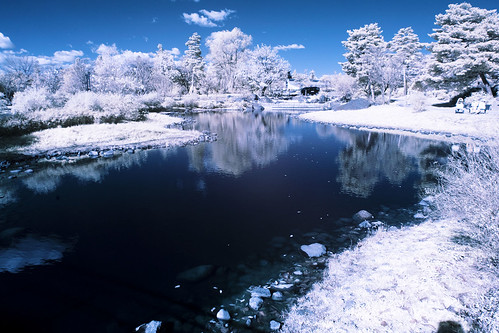
These are infrared images; pictures with recorded light beyond the visible spectrum. You can take infrared photos by using an infrared filter that screws on the front of the lens, or you can convert your camera to take IR photos permanently.
Why Take Infrared (IR) Photos?
Infrared photography darkens clear blue skies a lot, but leaves the individual clouds very bright. Infrared photography leaves foliage (grass, plants, leaves) looking bright white. It allows you to take photos with longer shutter speeds, and gives your photos an awesome look in general.
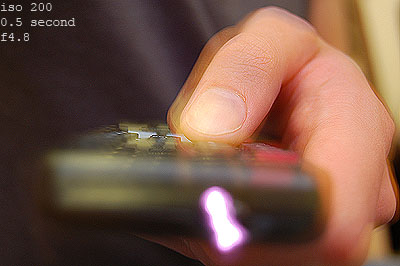
Nikon D50. ISO 200, 1/2 second, f4.8. This camera is very sensitive to IR light
Can my camera take IR photos?
Older Nikon cameras, like the Nikon D50 andD70 work very well with the Hoya R-72 Infrared Filter
. However, a lot of newer camera sensors now have a filter that blocks out IR light in front of the cameras sensor (to a degree). In order to find out if your D-SLR can take infrared photos, find a remote control that goes to your TV, or something similar. Take a 1 second exposure. During that exposure, click the power button on your remote, pointing it towards the camera lens. When you look at the picture on the LCD preview screen, you should see a light coming from the front of the remote. If the TV remote light looks very dim, the exposure time will have to be longer when using an IR filter. BUT, if the TV remote light looks pretty bright, your camera is well suited for infrared photography. Try doing this test with different lenses as well; some are better for IR photography than others. If you don't see anything coming from your remote, you won't be able to take infrared photos with your camera using an IR filter. You can however, get your camera's sensor modified by LifePixel. Conversion costs about $300-$500, and shutter speed times are normal, as is focusing. Your camera will be permanently modified for infrared photography!
But, if your camera passed the TV Remote Test, then you can go the easy/cheap route and start taking infrared pictures with the Hoya R-72 Infrared Filter. Mine was $54 for a 52mm sized filter.
Some lenses just don't work that great with IR filters and create hotspots. I myself however haven't had any problems with "hotspots" in any of my photogs before.
Here is a list of cameras and lenses that are good for IR:
Good/Bad Infrared Lenses List
Good/Bad Infrared Camera List
Taking Infrared Photos Using the Hoya R72 Filter:
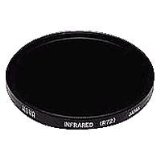
When you get your filter, you will notice it looks almost black. Because the filter is so dark, you will need to focus your scene before putting the filter on. Once you have your scene in focus, screw your filter on, and then switch to manual focus. You CAN use autofocus with the filter on, but you have to be in broad sunlight for this to work, and it isn't always accurate....
Lenses focus differently when using an infrared filter. If you want technically sharper results, you can rotate your focus ring about 1 millimeter away infinite symbol (depending on your lens). Some lenses will have an infrared symbol on the lens itself, which is useful. Use that mark if it does. If it doesn't though, you'll have to play a little guess-and-check game to find the infrared focusing spot. You CAN use the cameras autofocus, it will just be slightly out of focus (I've taken many photos like this anyway.) Try a few test shots using the autofocus, you may find it acceptable. Also try using higher F numbers to increase the depth of field, that might help a little bit.
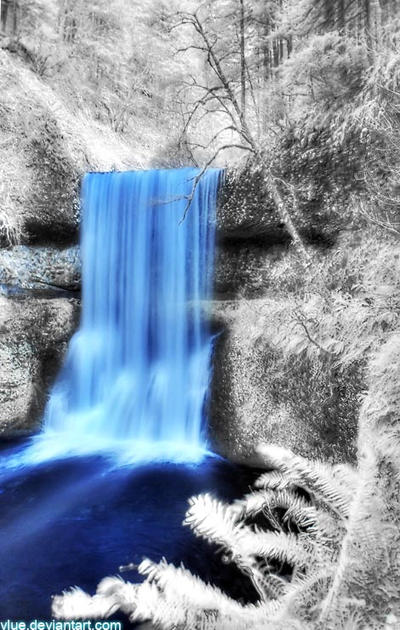
Infrared Photography allows the use of longer shutter speeds.
You also CAN take infrared pictures without using a tripod, but it is not recommended. You will need to use high ISO numbers, and low F numbers, and those usually are not good for landscapes. Just avoid all of that mess by using a tripod. Your photographs will look a lot more professional.
Now, if you haven't noticed by now, the Hoya R72 filter is DARK. This will substantially increase shutter-speeds. If you need shorter shutter speeds, you can raise the ISO number and lower the F number. I usually don't do much of that myself, though.
If your photos are coming out too dark, just bump up the EV until you are satisfied. The shutter speeds will be quite long when using the IR filter (depending on how sensitive your camera is to IR).
Setting The White Balance for Infrared Photography:
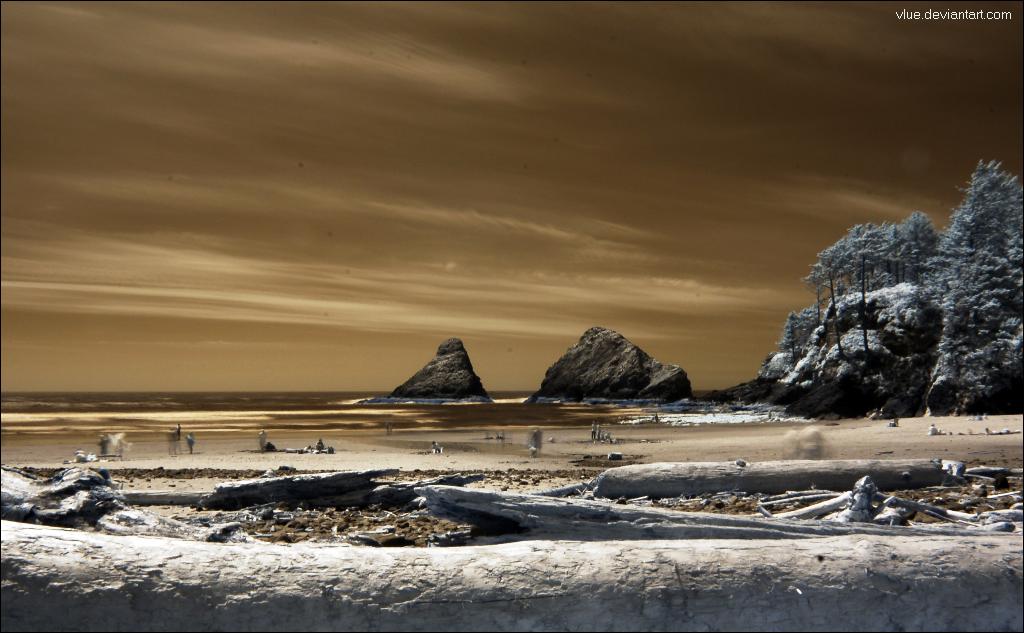
After taking some photographs with your filter, you may have realized that your pictures are completely RED. In order to fix this, just meter and set the White Balance with your filter on. Google "How to set white balance with [YOUR CAMERA MODEL]" for instructions, if you don't know how to do this already.
HOWEVER, a lot of cameras cannot set extreme infrared white balances in camera. If you can't get your camera to work, just shoot in RAW and set the WB later in post processing with a program called UFRAW. This method should work with any camera. UFRAW is way better than Adobe Camera RAW because it can set the white balance for infrared photography which A.C.R. can't properly do.
Editing IR Photos in Photoshop:
The popular look for infrared photography: have a blue sky instead of brown.
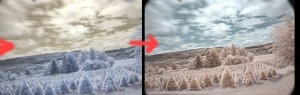
Image on the left is before the red/blue channel swap, image on the right is after it
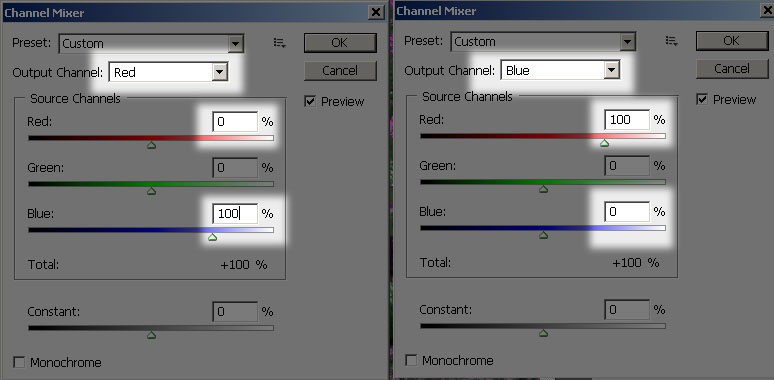
It's quiet easy to obtain this look. In Photoshop, go to Image > Adjustments > Channel Mixer.... Make sure the "Output channel" is selected on Red inside of the dropdown box. Type in 0 for red, and 100 for blue. Next, select the Blue output channel but selecting it in the drop down box. Type in 100 for Red, and 0 for Blue. You've just swapped all the red colors for all the blue ones. Feel free to experiment with other channel swapping variations, I've seen pink and yellow foliage before

If your foliage in your pictures look too red-ish, and you want them pure white like snow, you can easily desaturate them using Image > Adjustments > Hue/Saturation. Select Red (Alt+3) and then slide the saturation slider all the way down to -100.
I would also recommend darkening the levels a little bit. The 2 examples above was not adjusted for that, and it looks a bit faded.
IR Examples Chart:
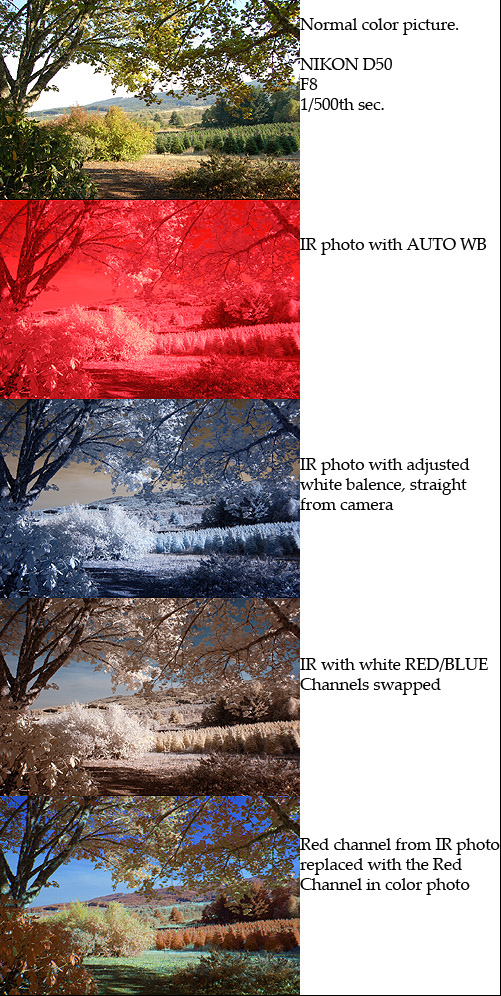
Keep in mind that this was a cloudy day. If it was a pure blue sky, the sky in the IR photos would look much darker.
Editing Infrared RAW Photos in Adobe Camera RAW:
If you want to set the white balance using Adobe products, you can download the DNG Profile Editor and then watch this video tutorial describing how it is done. But, like I said before, I recommend using UFRaw instead of Adobe products.
Using Two Infrared Filters May Get Better Results:
I have access to two Hoya R72 filters. I stacked them on top of each other and used both of them on my lens simultaneously. The results seem to have more color and depth. People seem to debate about this. What do you think?
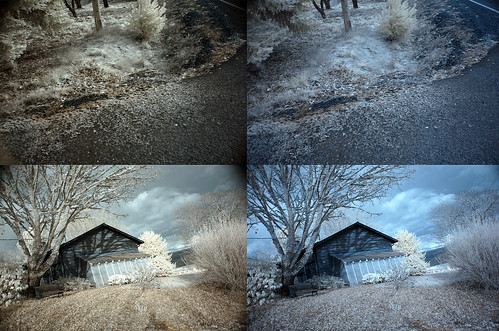
The images on the left was taken with two IR filters stacked on top of each other, and the image on the right was only taken with one. Red/blue channel swapped as well. Nikon D50
Here is the video tutorial that goes along with this article. It isn't as detailed as the written article, but it has more infrared photo examples that this article doesn't have:


September 22nd, 2009 - 06:56
interesting stuff. One thing I noticed with my IR shots (I have a converted 300D from lifepixel) is that the brown looking items actually register as BLUE when I do the channel swap (just like the foliage), so if I try to desaturate them i lose the blue in the sky. Its kinda frustrating because the color is clearly a brown/red hue – and I know I am not color blind haha.
I really like the effect you get with a double stack of filters. Maybe I will try throwing one on my converted camera just to see if I get similar results.
October 2nd, 2009 - 07:04
@vincent
Try some different preset WB (white balance). I’ve had community concentrating on IR photography. Some people there suggesting to try various color for preset WB. Different WB can produce different color tone on your final image.
For the post process thing in photoshop, I highly suggesting in use of adjustment layers and masking. Yes, it’s frustrating indeed post process an IR photo
.
October 4th, 2009 - 00:27
new blogs
October 4th, 2009 - 01:19
best new blog
October 4th, 2009 - 05:25
2znqoh I want to say – thank you for this!
October 21st, 2009 - 16:56
Hello from Russia!
Can I quote a post in your blog with the link to you?
October 22nd, 2009 - 18:32
Sure! give me a link to the article so I can see
November 4th, 2009 - 07:47
this is great

I’m new to photography and IR Photography is something that is of a huge interest to me
Thanks for the article…
November 8th, 2009 - 04:21
Hi, thanks for the article. I’m struggling with setting the WB with the filter on. I’m using a Nikon D200 and I can set the WB normally with the filter off but each time I try the PRE with the filter on I get a ‘No Good’ message. It is an overcast day – can I only really do this in bright daylight or am I likely to be doing something wrong?
Thanks, Lee.
November 8th, 2009 - 20:17
Hey Lee.
From my understanding, the Nikon D50 and D70 can set the white balance in camera, but the newer models can’t. No one has seemed to be able to give me a clear answer on this, and I myself haven’t been able to set the white balance for my D300s when using IR filters either. You will need to take your images in RAW format and then download a free program called UFRaw to change the white balance for the best result. You could also use Adobe Camera Raw, but I don’t recommend it because you can’t set the white balance past a certain point; your results won’t have the brown/blue colors.
November 9th, 2009 - 12:23
Hi,
Thanks for that answer… fortunately I have a Nikon D50 as well sat gathering dust so I’ll use that instead!
Cheers, Lee.
December 4th, 2009 - 23:28
wonderful tutorial……I use D40….will hoya R72 work on this?…thanx
December 5th, 2009 - 16:15
Yep, it looks like the R72 will work good with your D40. I did a search on Flickr for “D40 R72″ and several results came up:
http://www.flickr.com/search/?w=all&q=d40+r72&m=text
December 17th, 2009 - 06:18
Super post, Need to mark it on Digg
Thanks
Ivan
December 21st, 2009 - 09:18
Great tutorial – made me get back to messing with my old IR shots – an R72 on a D80 doesnt work too well i have to say but still gets some nice shots. Hoping to upgrade soon though as its falling apart after 3 years of shot!
December 21st, 2009 - 09:42
Hi, photoextremist.com – da best. Keep it going!
Ivan
December 28th, 2009 - 22:27
Interesting, did you plan to continue this article?
Bottomless
December 30th, 2009 - 23:02
Did I plan to continue it? What else would you like me to say?
March 1st, 2010 - 19:11
Hi,
I really Love your picture at the bottom of your IR Examples Chart, could you just explain the process a little more for me please as I just cannot figure out how to get such colourful images from my Canon 5D Converted with 720nm filter.
Thankyou
Jamie McKerral
UK
March 2nd, 2010 - 19:50
I made a video about this just now, here you go
http://www.youtube.com/watch?v=Z-ZdYxkVK8Q
did that explain everything?
March 18th, 2010 - 12:25
Dude! After checking your page, and watching the video, I took two shots outside my window….and I see so much potential!! Thanks to you, I’m on my way. Thanks for the detail in explaining everything. You, my man, ROCK!
April 4th, 2010 - 21:58
so i’ve been playing around with my D50 and the hoya infrared filter, and the other day, i decided not to adjust the white balance directly from the camera. So i left it in auto-wb and of course all the images came out red. I used the Chanel mixer in photoshop, but then the image turned blue. Which would make sense since the image was red before. lol
So, i guess my question is, is there a way of fixing this on photoshop? or best just to shoot the pics, with the wb adjusted directly from the camera?
thank you!
April 5th, 2010 - 17:12
Hey Bianca
Unfortunately I don’t think there is a way to change the white balance of an infrared JPEG. You can sort of half-way fix it if you are in Photoshop CS4 by clicking Auto-Tone and Auto-Color; it will change the image back to it’s regular state as much as it can, but you loose some color information and quality. I think that the best way to take infrared photographs with the D50 would be to choose the WB in camera.
April 5th, 2010 - 21:27
ello Evan!
I’ll do that for sure next time. The red is kinda cool, but just so… red. lol I’ll play around with a few and see if get anything neat out of them.
thanks again.
April 16th, 2010 - 02:22
nice post.. but how do you that blue sky n a white foliage? im using a nikon d80 with r72 but i dont get the same result as you say here. all i get is the same as ur photo with auto WB. n when i try to edit it in photoshop i can never separate a color of blue sky to my white trees and grass.hope you can help me by showing us how to edit it in photoshop to look like the photo with “WB adjusted straight from the camera”..
April 16th, 2010 - 16:01
Try setting your shutter speed for a longer time if you can, shoot in RAW format, then when you get back to your computer open the RAW file in a program called UFRAW. Click the AUTO WB inside of UFRAW and your photo should now have brown skies and blue foliage.
Let me know if it comes out alright or if you need any more help
June 17th, 2010 - 05:04
hi..i have a canon 400d..it is ok just use a filter without converted the camera..and can u give me the best setting for that..tq
June 17th, 2010 - 11:40
You can do IR with the Canon 400D, but the results won’t be excellent.. only okay.
After Googling “Canon 400d ir filter” I found some discussions that might help you make your decision:
http://photo.net/canon-eos-digital-camera-forum/00Krce
http://photography-on-the.net/forum/showthread.php?t=314384
As far as what setting, just shoot in RAW and then import the file into UFRaw and then change the white balance to AUTO in the program, then export it.
June 21st, 2010 - 21:53
thanks for help..hope more article/tutorial will come out soon..cheers..
November 6th, 2010 - 21:27
Thank you so much for this article!!! One thing i’d like to ask you since google-ing doesn’t give me any conclusive results is if the hoya filter will work on my Nikon D3000 ? Yes I could always buy a converted one on ebay (or another Nikon camera that DOES give me results as i google it) but I just so much wanted to check if this is possible on my current camera – please, if you do know anything about this do let me know.
November 9th, 2010 - 23:06
Hey Sunneva, looks like you can: http://www.flickr.com/photos/38432295@N06/4528953170/
Read the comments on that image
July 10th, 2011 - 21:27
hi evan sharboneau
I’m one of the your fans and i bought your book named trick photography and special effects. I quite interested in infrared.I cant get the result like your nice photos. Is that possible that you will make a video tutorial how to edit infrared including white balance? I will be grateful if you consider about it…
thanks
July 19th, 2011 - 18:28
Hi Melvin, I have made one, what is your email address?
August 29th, 2011 - 19:49
Hi! I was just curious to know if there is a way to get IR photos on a sony cyber shot dsc tx100? To be honest, I am looking for a new camera so if there is no way to make IR photos on the dsc tx100, is there a custom lens for the cyber shot dsc hx100? Just let me know if you come up with anything!
Thanks!!
December 1st, 2011 - 10:49
Hi Evan, I got your ebook (first edition) and I was very interested on IR Photography, I just bought an Hoya r72 IR filter and I am shooting long exposures with a Canon 400D. I tried to set custom white balance straight on my camera and I still get all reddish photos, I also opened the reddish photos into UFRAW set the white balance into Auo and it just convert them into purple. Then I go to Photoshop CS5 and set the chanel mixer and it just turn the photo in dark blue with a lot of noise. I tried to change hue and saturation and still blue. I have followed all the steps in your book but still don’t know how to get white foliage like your awesome photos. Do you have a post procesing incluiding white balance setting video tuorial for dummies?? I will apreciate it a lot. Thanks a lot Evan. You Rock. Greatings from Mexico.
December 1st, 2011 - 10:50
Hi Evan, I got your ebook (first edition) and I was very interested on IR Photography, I just bought an Hoya r72 IR filter and I am shooting long exposures with a Canon 400D. I tried to set custom white balance straight on my camera and I still get all reddish photos, I also opened the reddish photos into UFRAW set the white balance into Auo and it just convert them into purple. Then I go to Photoshop CS5 and set the chanel mixer and it just turn the photo in dark blue with a lot of noise. I tried to change hue and saturation and still blue. I have followed all the steps in your book but still don’t know how to get white foliage like your awesome photos. Do you have a post procesing incluiding white balance setting video tuorial for dummies?? I will apreciate it a lot. Thanks a lot Evan. You Rock!!. Greatings from Mexico
March 9th, 2012 - 11:29
hello, I’m a amateur photographer, interesting site, congratulations
I am also interested in IR photography
http://www.flickr.com/photos/midx
June 9th, 2012 - 10:22
Hello Evan,
Am a Rookie Photographer, Very informative and interesting site. Thanks for all your work
A Quick Question….Is Canon EOS Rebel T2i 550D a good fit for taking IR photos? I don’t have a TV remote for testing my cam:(
June 10th, 2012 - 13:54
Hi Even,
I’ve set the WB in the camera, on the camera preview it looks OK, but when I import it into PS or Lightroom it automatically sets it to the “red” version, and I can’t seem to get it back to the version I see on the camera (7D), what step to I miss? (I JUST purchased your book 2nd ed., so maybe I find my answer there)
August 17th, 2012 - 01:24
Hi Even,
Any clue on previous question? Lightroom keeps reverting them back to ‘red’ although in camera (RAW 7D) it looks great with custom WB.
February 11th, 2013 - 22:46
Hi, Neat post. There is an issue with your web site in web explorer, could check this? IE still is the market leader and a big element of people will omit your wonderful writing because of this problem.
May 21st, 2013 - 09:19
Great page and tutorials !! congratulations. I have Canon T3 and bought an infrared filter, took some test pictures and those (as you stated on this article) appears full red. So I’ll have to do the White balance procedure. I took pictures in B&W and I guess it must do the same about WB. Will see how it works this thing. Saludos desde México !